

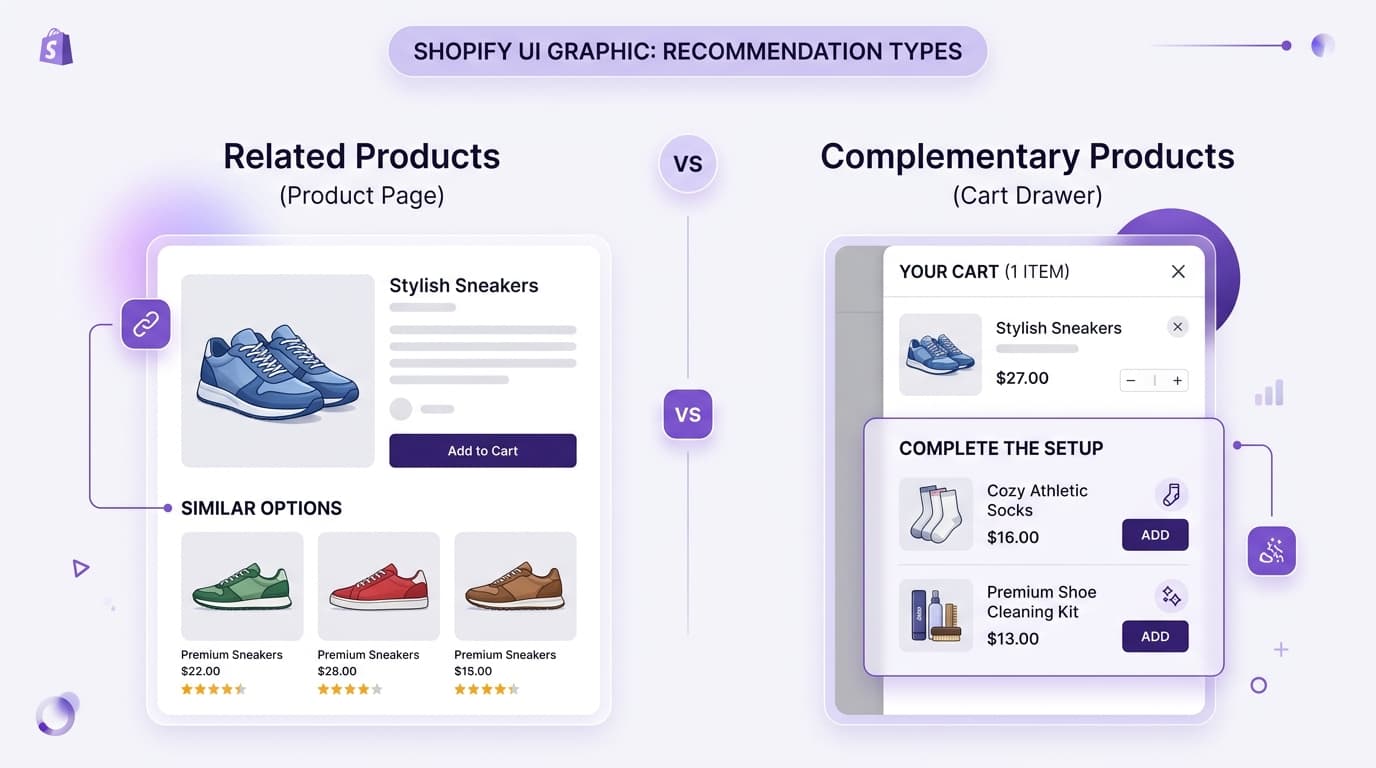
Open almost any product page and you'll see a row of recommended items underneath it. Most merchants treat this as one feature — 'show some other products.' In reality, the strongest Shopify stores treat it as two different features with two different jobs, and several of them label the sections differently on purpose so customers understand what they're looking at.
This guide breaks down the difference between related products and complementary products, shows how real Shopify stores use each one, and explains where each belongs in the customer journey.
The Core Difference
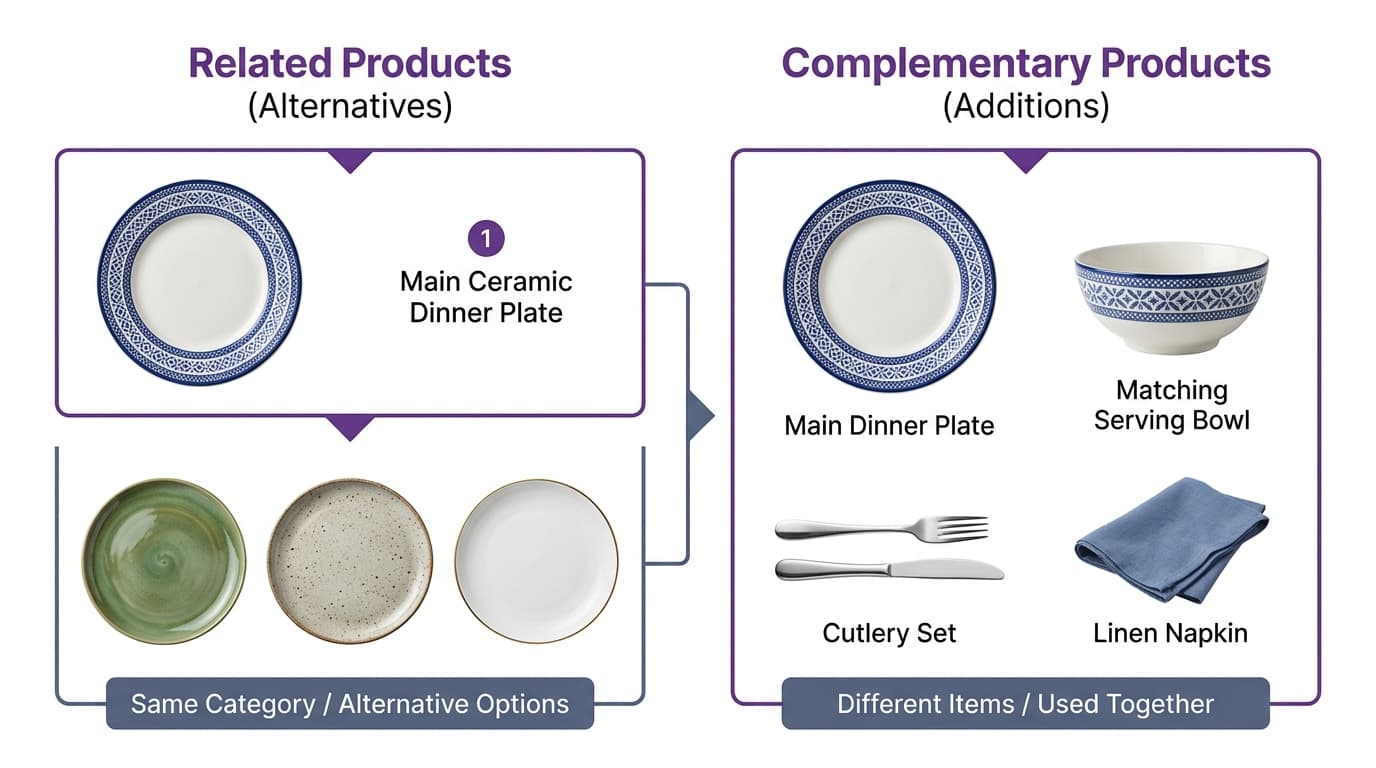
Related products are alternatives — items similar to what the customer is already looking at, usually in the same category. Example: another pair of running shoes when you're viewing a pair of running shoes.
Complementary products are additions — different items that get used together with what the customer is already buying. Example: running socks and insoles shown alongside a pair of running shoes.
| Aspect | Related Products | Complementary Products |
|---|---|---|
| What they show | Similar/alternative items | Different items used together |
| Customer's mindset | Still deciding, comparing options | Already decided, may add one more thing |
| Goal | Help them pick the right item | Increase the size of the order |
| Best placement | Product page (before add-to-cart) | Cart, checkout, post-purchase |
Real WeUpsell Customer Examples
The brands below are real, currently-featured WeUpsell customers. Widget placements are confirmed from WeUpsell's own site; specific internal AI-setting choices (which exact recommendation source each brand uses) are not disclosed publicly, so the framing below is based on placement strategy, not internal configuration claims.
Rakhi By Diorin & Veera Ki Rakhi: Related-Style Recommendations
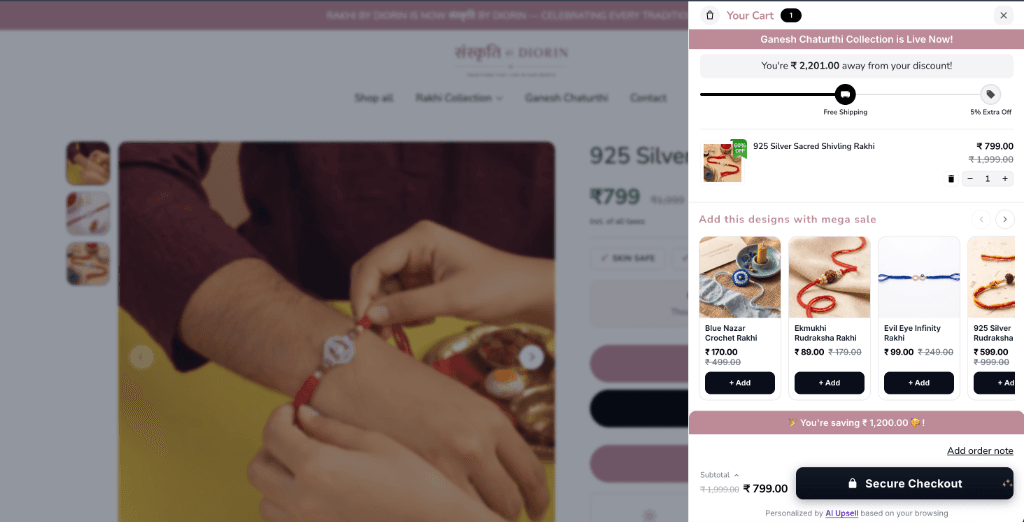
Both Rakhi By Diorin and Veera Ki Rakhi — Shopify stores selling handcrafted rakhis and festive jewellery — run WeUpsell's Product Page Upsell and Recommendation widgets, placements built for a shopper who's exploring between designs, styles, or price points. This is the natural home for related/alternative-style recommendations: a shopper browsing rakhi designs benefits from seeing more similar options in that moment.
MND (Beautiful Minds) & Zitara: Complementary 'Complete the Look' Recommendations
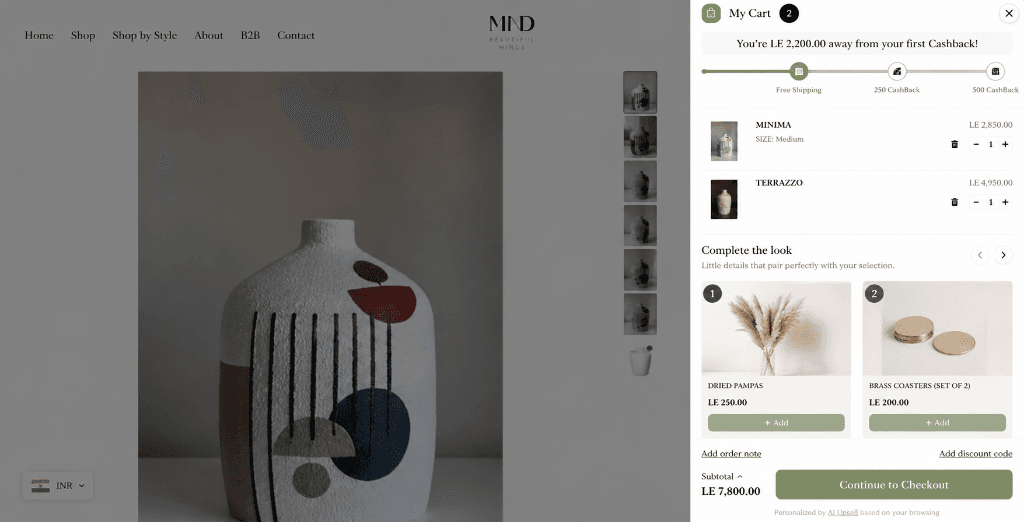
Shopify stores in the home and lifestyle space like MND and Zitara use WeUpsell's Cart Drawer Upsell specifically for complementary merchandising: by the time a shopper adds a vase to their cart, they have already chosen their primary item. The recommendation shown there is built to add to the order — offering matching dried pampas grass and brass coasters — a low-friction, 1-click addition that completes the look rather than reopening a decision that's already made.
Why Mixing Them Up Hurts Conversion
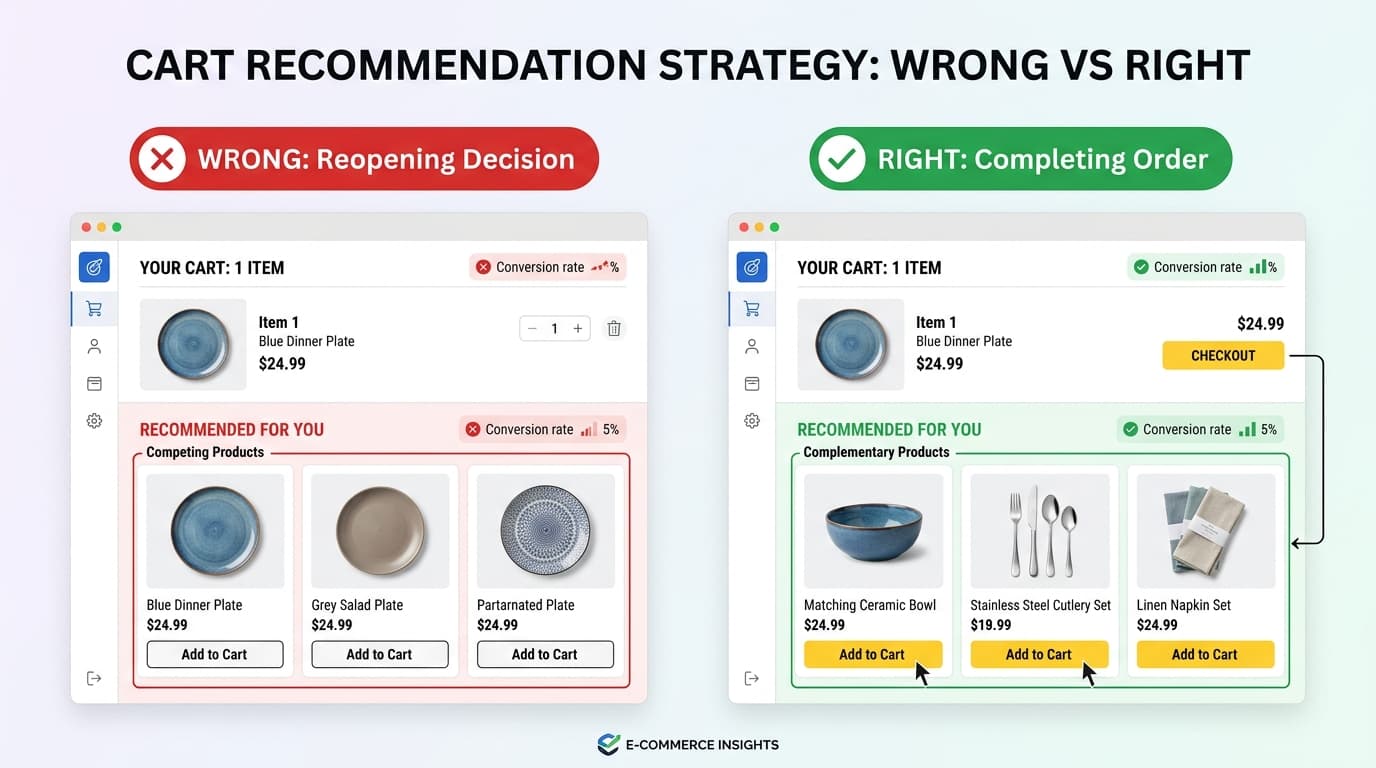
The most common mistake is showing related products in a complementary slot — for example, displaying three other dinner plates in the cart drawer when a customer has already decided on one. This does two things wrong at once:
- It re-opens a decision the customer already made, creating hesitation instead of momentum.
- It misses the actual opportunity — a serving bowl or cutlery set that would have added to the order instead of competing with it.
The WeUpsell customers above avoid this by matching the widget to the stage: related-style recommendations stay on the product page (Rakhi By Diorin, Veera Ki Rakhi), while complementary recommendations only appear once a shopper has committed — in the cart (Zitara, NNO Home).
Which One to Use, and Where
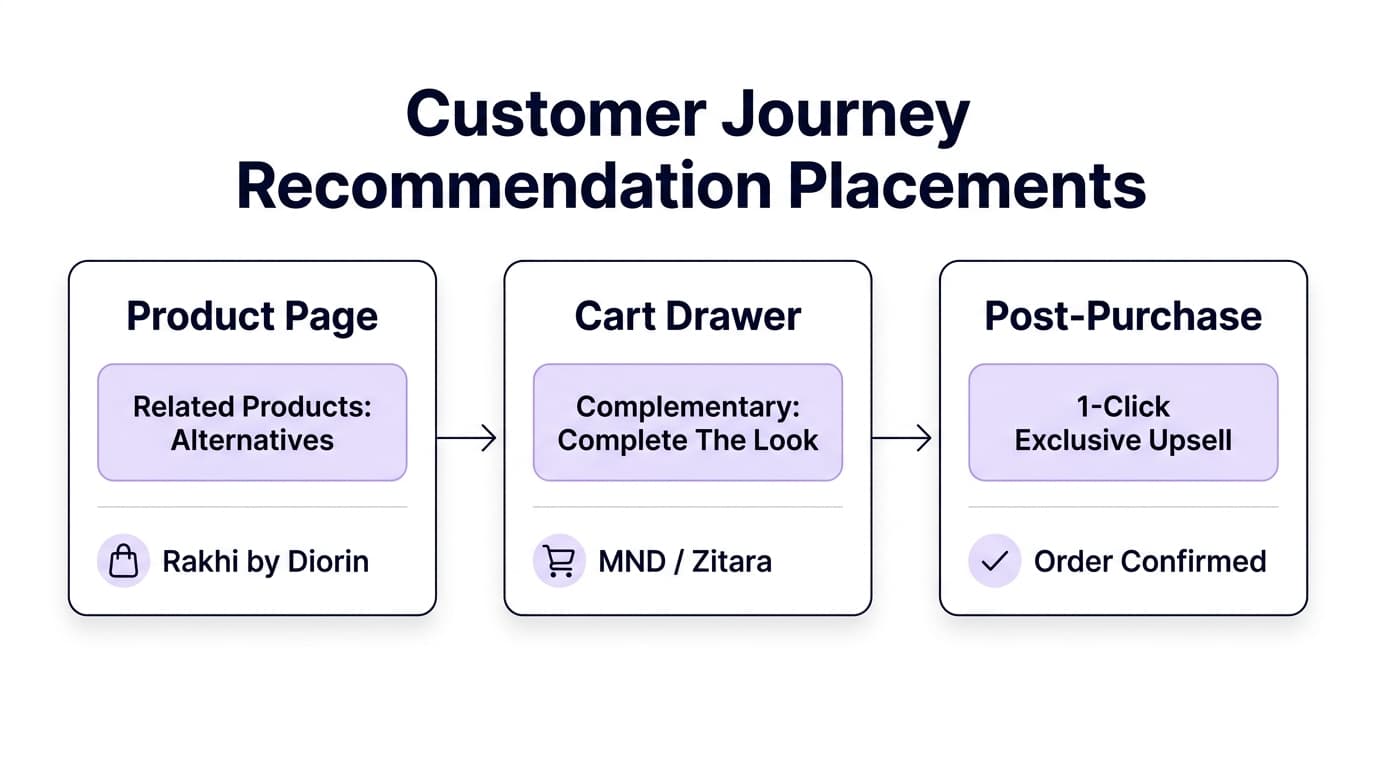
| Stage | Shopper's Mindset | Recommended Type | Real Store Example |
|---|---|---|---|
| Product page (browsing) | Still deciding between options | Related products | Rakhi By Diorin & Veera Ki Rakhi's Product Page Upsell |
| Cart | Has committed to buying | Complementary products | Zitara & NNO Home's Cart Drawer Upsell |
| Post-purchase | Just paid, still engaged | Complementary products | Post-Purchase One-Click Upsell |
Notice that related products really only belong in one place — early in the decision, on the product page. Everywhere else in the journey, the shopper has already decided, and a complementary item respects that decision instead of reopening it.
How to Tell Which Type Your Store Is Currently Showing
Open your own cart drawer right now. If it's showing more of the same category you just added — more dresses, more plates, more of the same shoe style — that's related-products logic running in a complementary-products slot, the same mismatch that Zitara and NNO Home's cart-drawer setup avoids by design.
How AI Handles This Better Than a Single Static Rule
A static 'related products' app usually can't tell the difference between these two use cases — it's built around one logic (usually category similarity) and applies it everywhere. An AI-driven recommendation engine can be tuned differently by placement: surfacing genuine alternatives on the product page, and genuine complements everywhere past that point, based on what actually gets bought together rather than what merely shares a category tag.
WeUpsell's AI Product Recommendations engine is built around this exact distinction — 'Recommended by WeUpsell AI' for related/alternative recommendations, and 'Smart Recommendations' for complementary ones — configurable separately at every placement from the product page through post-purchase.
👉 Step-by-step tutorial: Learn how to set up related & complementary product upsell offers in WeUpsell (no code needed) with our complete walkthrough.
Frequently Asked Questions
Are related products and 'frequently bought together' the same thing?
No. 'Frequently bought together' is typically a complementary recommendation — items purchased alongside each other, like the cart-stage add-ons Zitara and NNO Home show. Related products are typically alternatives within the same category, like the product-page widget Rakhi By Diorin and Veera Ki Rakhi use.
Should my product page only show one type of recommendation?
Not necessarily — many stores show related products higher on the page (for comparison) and save complementary suggestions for the cart or post-purchase stage.
Which type converts better?
Neither is universally better — it depends on placement. Rakhi By Diorin's product-page (related-style) widget drove the highest revenue purely on traffic volume, while Zitara and NNO Home's cart-stage (complementary) widget converts on a smaller, already-committed audience.
Can one recommendation widget do both jobs?
Not well. It's more effective to use the right logic for each placement — as WeUpsell customers like Rakhi By Diorin, Veera Ki Rakhi, and Zitara each do — than to make one widget serve every stage.