

Most Shopify stores still run "related products" the same way they did a decade ago: a merchant picks a handful of items, pins them to a product page or collection, and every visitor sees the same static list — whether they're a first-time browser or a repeat customer who's ordered five times before.
Modern AI Product Recommendations replace that manual guesswork with a system that decides, per shopper, what's actually worth showing. Instead of showing everyone the exact same static list (such as a generic t-shirt and standard mugs for every visitor), the engine adapts dynamically per visitor—surfacing complementary sneakers, accessories, or matching apparel tailored to each person's unique browsing intent with automated personalized recommendations.
This post walks through how that actually works, using real ecommerce scenarios rather than abstract feature lists — along with where it tends to fall short.
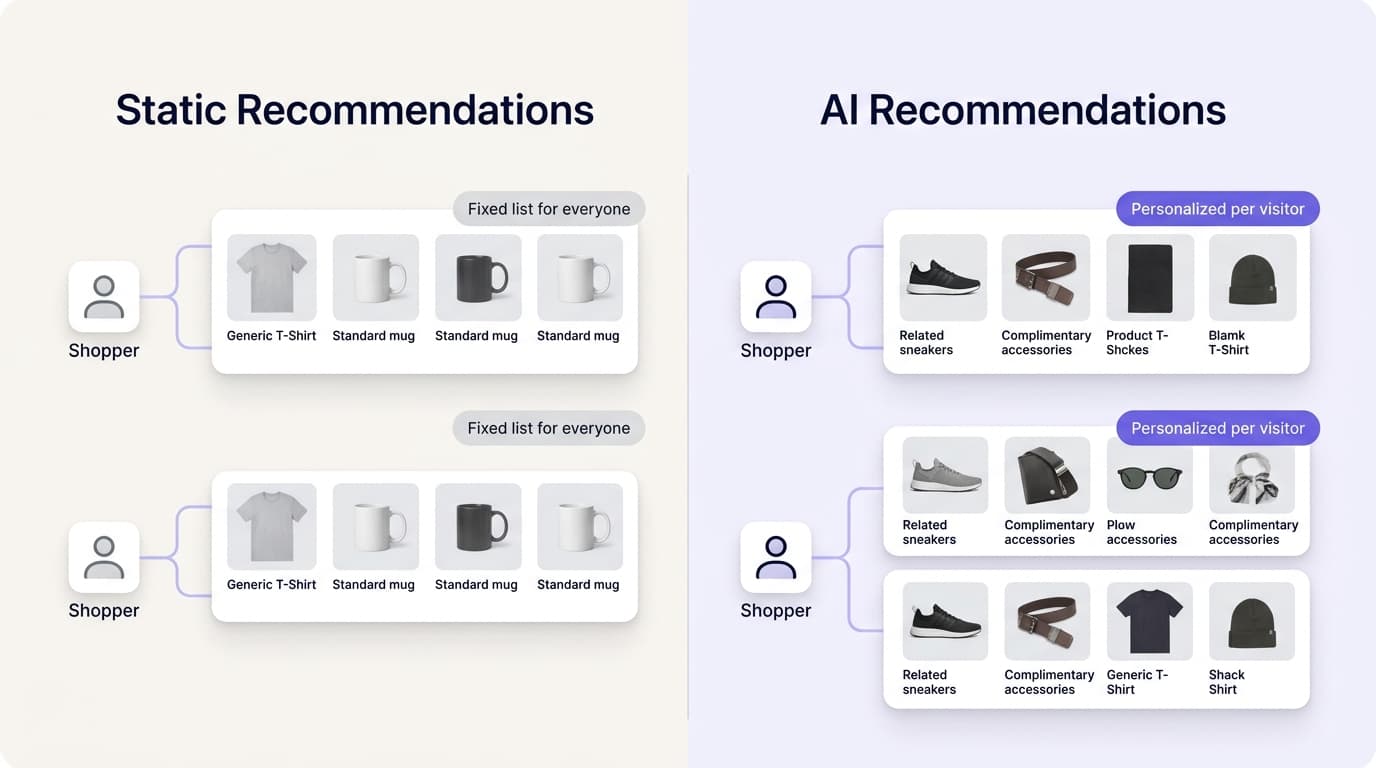
Why manually curated recommendations fall short
Manually selected offers work fine at a small scale — a 20-product catalog with a handful of obvious pairings doesn't need machine learning. But they break down fast as a store grows:
- They don't scale. A merchant can hand-pick pairings for 20 products. They can't realistically do it for 2,000, and the pairings never get revisited once set.
- They're identical for everyone. A shopper buying their first item and a loyal repeat customer see the exact same suggestion, even though their intent is completely different.
- They miss non-obvious patterns. A merchant might never think to pair a yoga mat with a specific resistance band, but if the data shows shoppers keep buying them together, that's a pairing worth surfacing — and a human curating by hand is unlikely to catch it.
AI recommendation engines address all three by learning from actual behavior instead of running on a fixed list someone set once and forgot about.
What signals an AI recommendation engine actually uses
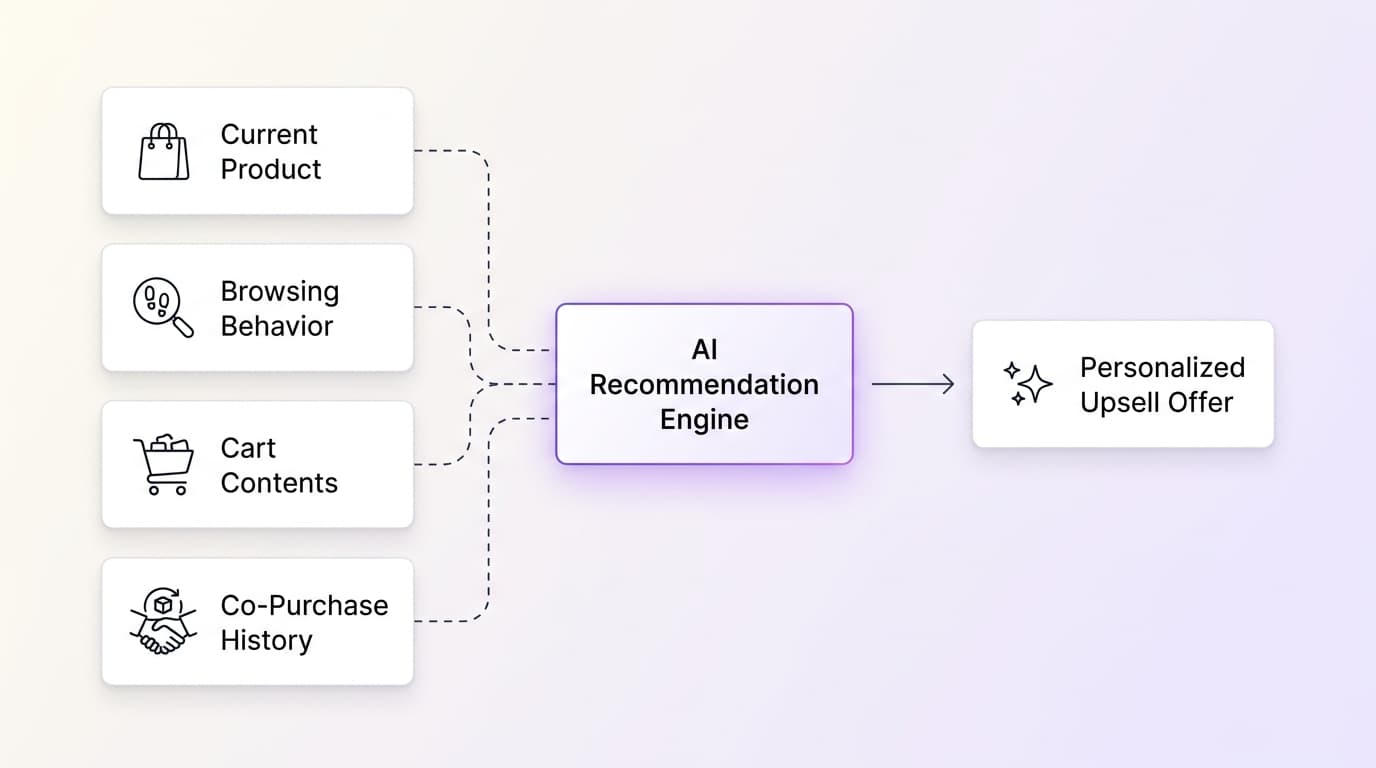
There isn't one single input driving these systems — a well-built engine blends several signals together:
- The current product. What a shopper is looking at right now is the strongest immediate signal of intent. An engine compares this product's category, price point, and attributes against the rest of the catalog to find genuinely similar or complementary items. This is also the only signal available for a brand-new visitor with no browsing or purchase history — a situation known in the industry as the "cold start" problem, since the engine is starting cold, with nothing personal to go on yet.
- Browsing behavior. What someone has clicked on, scrolled past, or lingered on during this session tells the engine more than the current page alone. Someone who's viewed three different running shoe pages is signaling something different than someone who landed on one page from a search ad.
- Cart contents. What's already in the cart is a much stronger signal than browsing history, because it reflects a decision that's already been made. A cart with a coffee grinder in it is a clear opportunity to suggest whole bean coffee or a cleaning brush — not a discovery problem, but a basket-building one.
- Purchase patterns across all customers. This is where "customers who bought this also bought that" logic comes from — known as collaborative filtering. It doesn't require understanding what a product is, only that enough past orders show a pattern.
The strongest systems combine all four: using the current product and catalog attributes to work even for a brand-new shopper, then layering in behavior, cart, and cross-customer patterns as more signal becomes available.
How this plays out in practice: four scenarios
Scenario 1: A first-time visitor lands on a product page
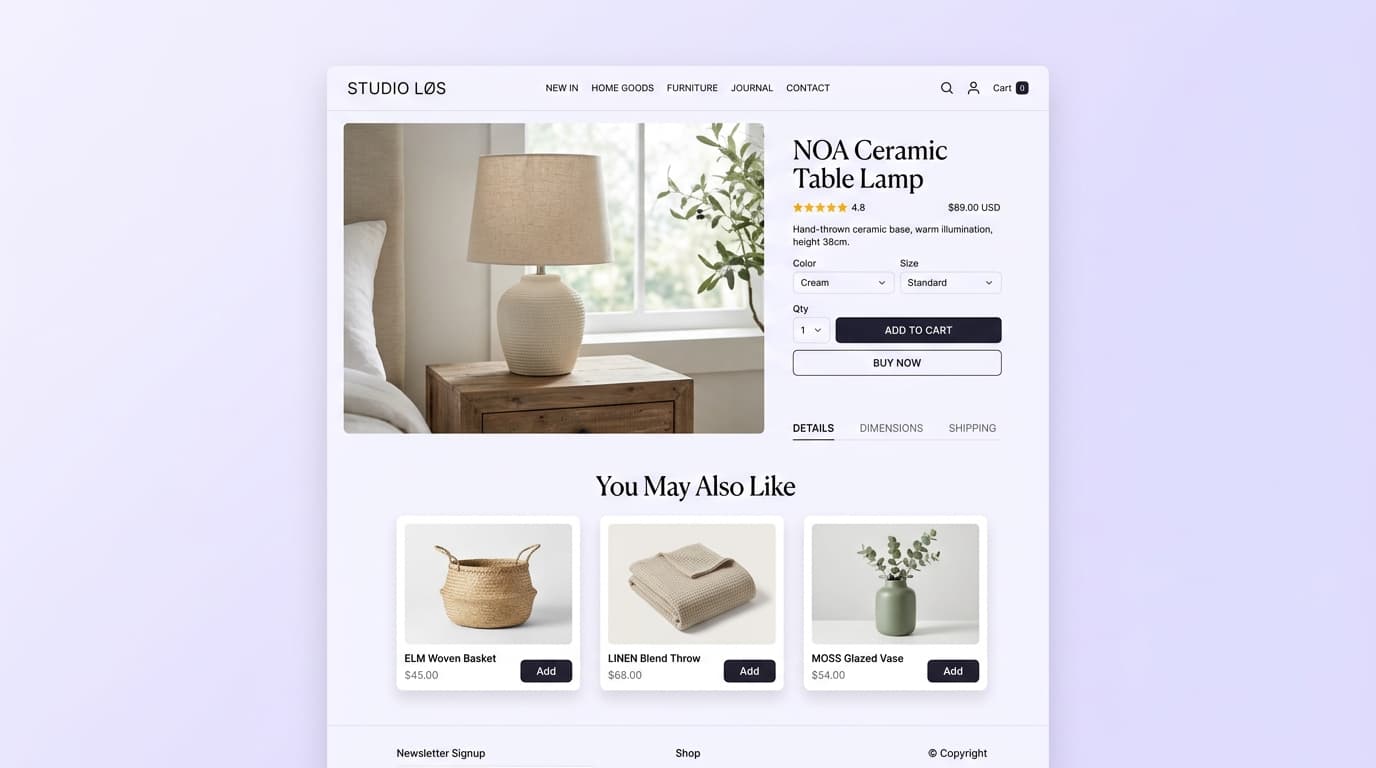
A shopper arrives from a Google search directly on a specific product page—like the NOA Ceramic Table Lamp shown below. There's no browsing history, no cart, and no customer account—the classic cold-start scenario.
This is where catalog attribute matching excels in Product Page Upsells. Rather than showing a disconnected list, the AI engine evaluates category, aesthetic, and price points to surface complementary home goods in the "You May Also Like" widget—such as an ELM Woven Basket, a LINEN Blend Throw, or a MOSS Glazed Vase—then refines suggestions the moment the shopper begins clicking or adding items.
Scenario 2: A shopper adds a coffee grinder to their cart
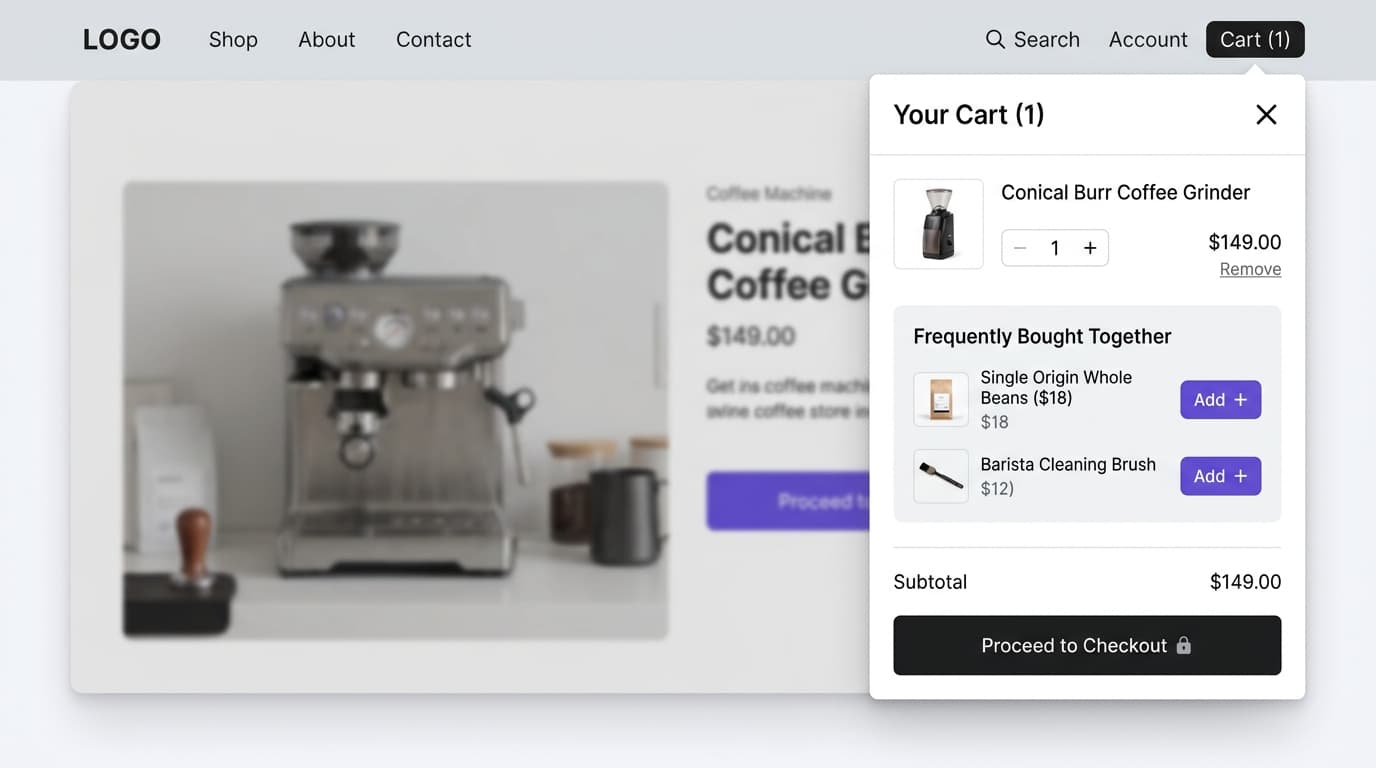
Cart contents shift the job from discovery to basket-building. The shopper has already decided to buy—the question now is whether there's something relevant worth adding alongside it.
As shown in the Cart Drawer Upsell example below, when a customer adds a Conical Burr Coffee Grinder ($149) to their cart, the AI engine immediately surfaces high-affinity add-ons in the "Frequently Bought Together" section: Single Origin Whole Beans ($18) and a Barista Cleaning Brush ($12). Because order history shows these accessories are frequently bought with this grinder, conversion rates on the add-ons are significantly higher than generic recommendations.
Scenario 3: A returning customer browses a new collection
A shopper who has ordered multiple times before visits the store to browse the latest seasonal collection. While the current session has just started, the AI already knows their historical style and price tier preferences.
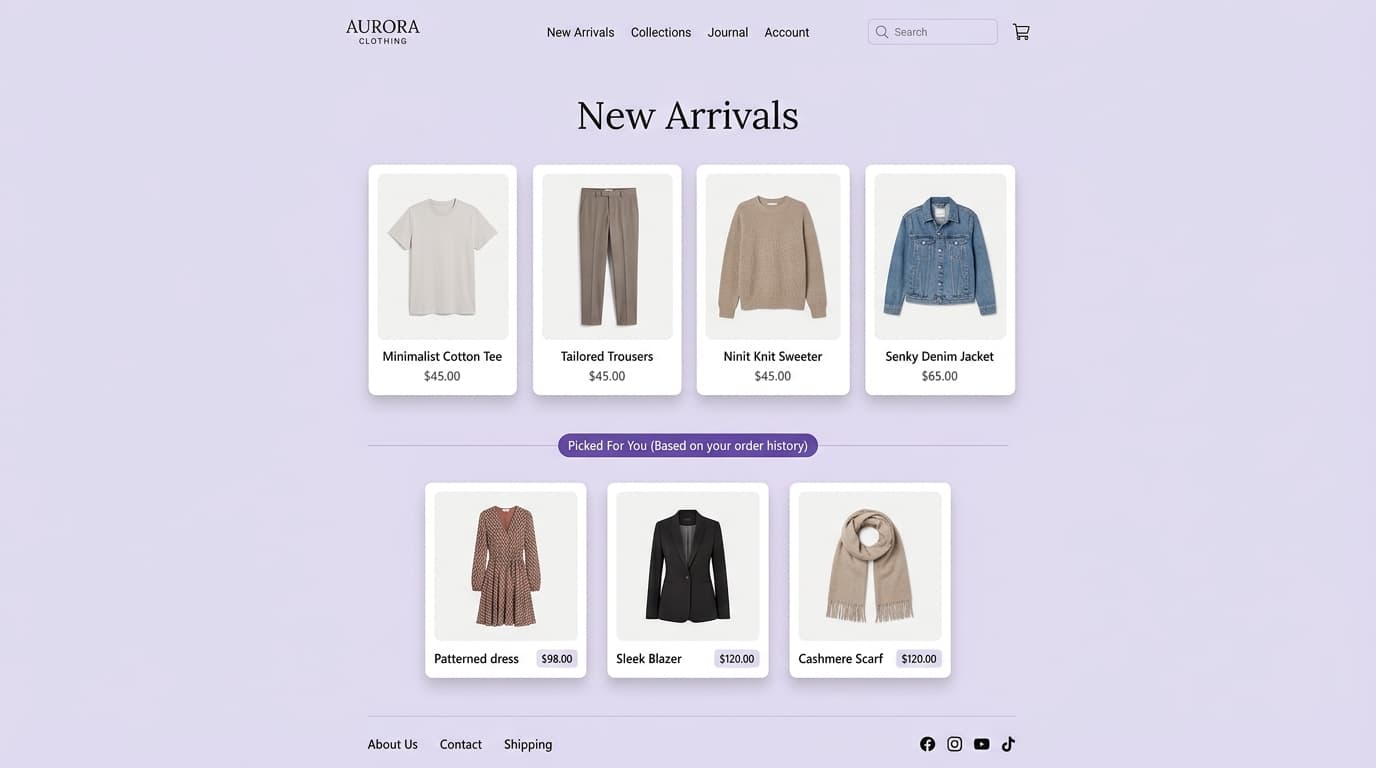
In the storefront example below, while first-time visitors see a standard "New Arrivals" grid (cotton tees, trousers, knit sweaters, denim jackets), this returning customer sees a dedicated personalized recommendation section: "Picked For You (Based on your order history)". The AI surfaces premium pieces matching their previous taste—such as a Patterned Dress ($98), Sleek Blazer ($120), and Cashmere Scarf ($120)—substantially shortening the path to re-order.
Scenario 4: A shopper keeps browsing the same category without buying
Someone views four different pairs of running shoes over one session but doesn't add anything to their cart. Manually curated recommendations have no way to react to this — the "you may also like" block on each page stays the same regardless of how many times it's shown.
An AI engine can pick up on the hesitation itself — repeated views within one category without a purchase — and adjust the recommendation to something more decisive: a bestseller in that category, a highly-rated option, or a slightly lower price point, rather than showing four more pairs of shoes that are all variations on a theme the shopper has already seen.
Where these recommendations actually show up on a Shopify store
The same underlying AI engine typically powers recommendations across multiple high-impact touchpoints in the buying journey:
| Placement | Primary Job | Signal It Should Lean On |
|---|---|---|
| Product Page | Help an undecided shopper discover the right item and bundles | Current product, catalog attributes |
| Cart Drawer | Increase basket size and unlock free shipping before checkout | Cart contents, co-purchase history |
| Checkout | Capture the highest-intent impulse add-on moments natively | Cart contents, co-purchase history |
| Post-Purchase / Thank You Page | Add frictionless 1-click offers to an order already placed | Full order, co-purchase history |
| Order Status Page | Re-engage returning customers checking shipment updates | Individual purchase and browsing history |
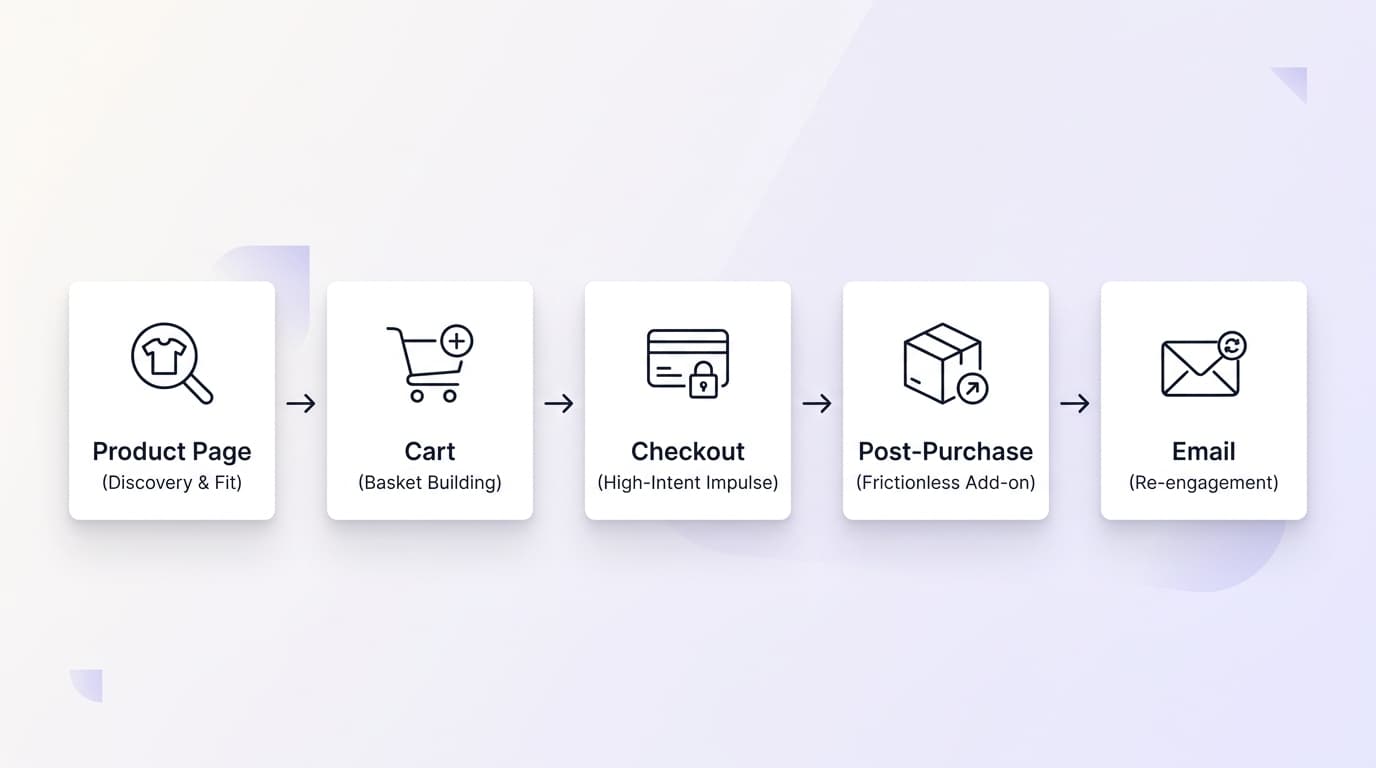
Treating all of these touchpoints as the same problem — one static list reused everywhere — is a common reason recommendation widgets underperform. A product-page block trying to do basket-building, or a cart block trying to do broad discovery, ends up doing neither job well.
To maximize store AOV, high-growth merchants deploy dedicated tools across each stage:
- Product Discovery: Deploy Product Page Upsells to recommend complementary accessories and 'Complete the Look' bundles directly on PDPs.
- Pre-Purchase Basket Building: Use Cart Drawer Upsells with tiered progress bars (e.g. Free Shipping unlocked) to encourage quick add-ons.
- Frictionless Checkout: Integrate native Shopify Checkout Upsells and WeUpsell Checkout extensibility without disrupting checkout flow.
- Post-Purchase Upsells: Offer 1-click upsells on the Post-Purchase Page and Thank You Page after payment is already authorized.
- Re-Engagement on Delivery: Turn shipment tracking into revenue using Order Status Page Upsells.
- Continuous Improvement: Measure ROI, conversion lift, and revenue per view using WeUpsell Analytics & Insights.
What actually makes these systems accurate
A few things determine whether an AI recommendation engine performs well or just adds visual clutter to a page:
- Enough order data to learn from. Collaborative filtering needs real co-purchase history. A brand-new store won't have much of this yet, which is why a fallback based on catalog attributes matters for the first few weeks.
- Clean product data. An engine can only judge similarity as well as the underlying product information — thin titles, missing categories, or generic descriptions all blur the signal.
- Inventory awareness. Recommending something that's out of stock does more damage to trust than showing nothing at all.
- A clear job per placement. As shown above, a recommendation on the product page and one in the cart should usually not be the same list, because they're solving different problems.
Where AI recommendations still fall short
It's worth being upfront about the limits, too. Cold-start visitors still get a fairly generic experience no matter how good the engine is — there's simply no personal signal yet to work with. Recommendations tuned too aggressively toward a shopper's exact past behavior can also start to feel repetitive or intrusive rather than helpful, especially in email. And any engine is only as good as the store's order volume and product data — a small catalog with thin descriptions will get mediocre results even from a well-built system. None of this is a reason to skip AI recommendations, but it's a reason to set realistic expectations and keep a sensible catalog-based fallback in place.
The bottom line
Manually curated recommendations aren't wrong, exactly — they're a fixed answer to a question that has a different answer for every shopper. An AI-driven approach adapts that answer per visitor, using signal that gets richer the longer someone shops: starting from the product itself, then layering in behavior, cart, and cross-customer buying patterns as they become available. The payoff isn't a smarter-looking widget — it's recommendations that keep improving the more a store learns about how its customers actually shop.
How do AI product recommendations differ from manual related products on Shopify?
Manual related products display a single fixed list chosen by the merchant for all visitors. AI Product Recommendations analyze real-time context—including current product attributes, browsing history, cart items, and collaborative filtering patterns—to dynamically personalize recommendations for each shopper.
How does an AI recommendation engine handle first-time visitors with no history?
For new visitors (the cold-start problem), AI engines fall back on catalog attributes like category, tags, and price points. As the visitor browses or adds items, real-time behavioral signals immediately take over across product pages and cart drawers.
Where should AI recommendations be placed on a Shopify store?
AI recommendations should be deployed across multiple touchpoints with tailored objectives: on Product Pages for discovery, inside Cart Drawers and Checkout for basket building, on Post-Purchase & Thank You Pages for frictionless 1-click add-ons, and on the Order Status Page for post-purchase re-engagement.